A parent stops you at pickup and asks which app you use to send the photos. Three doors down, the center that just opened is handing new families a card with a different app’s logo on it. You are standing in the hallway trying to remember whether the one you pay for is called HiMama or Lillio now, and whether the slicker one everybody mentions, Brightwheel, is worth the switch and the month of chaos it would cost you. You are not shopping software for fun. You are trying to work out which one keeps families happy enough to stay, and which one is quietly charging you more every time you fill a seat.
Here is the short answer, so you can stop refreshing comparison pages. HiMama and Brightwheel are now the two biggest parent-communication apps in childcare, and on the day-to-day job (daily reports, photos, messages, check-in) they are close to a tie. HiMama rebranded to Lillio in late 2023 and leans on curriculum and teacher training; Brightwheel leans on billing and, as of its 2026 release, built-in AI. Neither will tell you the price without a demo. And the part that matters most for your enrollment: neither app does the one job that actually fills your empty rooms. This post lays out where they differ, which fits a home daycare versus a 60-child center versus a small group, and what to use for the gap they both leave.
What this post covers
- What HiMama becoming Lillio actually changed
- What each one really costs in 2026
- How Lillio and Brightwheel compare on the things that matter
- The one job neither app does
- Steal this: the parent messages that do the work
- Which one fits you: home daycare, single center, small group
- The compliance part you cannot skip
- Your likely objections, answered
- Your questions, answered
What HiMama becoming Lillio actually changed
If you are confused by the name, you are not behind. HiMama rebranded to Lillio in late 2023. Same company, same app your families already use, new name on the icon. In the company’s own words from the launch, HiMama had “evolved into so much more than a platform for family communication,” so the name evolved too. HiMama Academy became Lillio Academy.
That is not just cosmetics. The rebrand signals where Lillio is putting its energy: curriculum, child assessments, and professional development for your teachers. Lillio built its reputation on daily reports, then stacked CDA-aligned lesson planning and teacher training on top. If your program lives and dies on documentation for a quality rating or a CDA credential, that focus is a real plus.
The practical catch: if you switch to Brightwheel, you are not just changing software, you are retraining every parent who learned to tap the HiMama icon at 7am. Hold that thought for the migration math later.
What each one really costs in 2026
Here is where both companies make you work for an answer. Neither Lillio nor Brightwheel publishes a usable price online. That is not a conspiracy, it is just how most childcare software is sold, and it is the single most frustrating part of shopping for it.
Lillio. Every major directory sends you to a sales call. Capterra lists the starting price as “contact vendor” with no free version, and G2 says Lillio has not provided pricing. There is no reliable public per-child number, and the aggregator figures floating around disagree with each other, so treat any specific dollar amount you see as unconfirmed until a rep says it on a call.
Brightwheel. Same wall. Capterra’s pricing page shows no list price, and you get a quote only after a demo. Operators commonly report a base fee plus a per-child charge, which is the model to watch, because a “$150 a month” tool quietly becomes $250 after a strong enrollment season and nobody re-reads the invoice.
So how do you compare two prices nobody will show you? You make them show you, and you ask the same three questions on both calls:
- What is the all-in monthly cost for exactly my number of children, with every add-on I would use?
- Is that flat, or does it go up per child as I fill seats?
- Is there a contract term, and can I export my data for free if I leave?
A tool confident in its value answers all three in plain numbers. A long pause on question three tells you more than the brochure does. For the full field, including Procare, Kangarootime, and Playground, see our teardown of what childcare software actually costs in 2026.
How Lillio and Brightwheel compare on the things that matter
A comparison grid only helps if the rows map to real decisions. Here are the ones that decide whether an app earns its monthly bill.
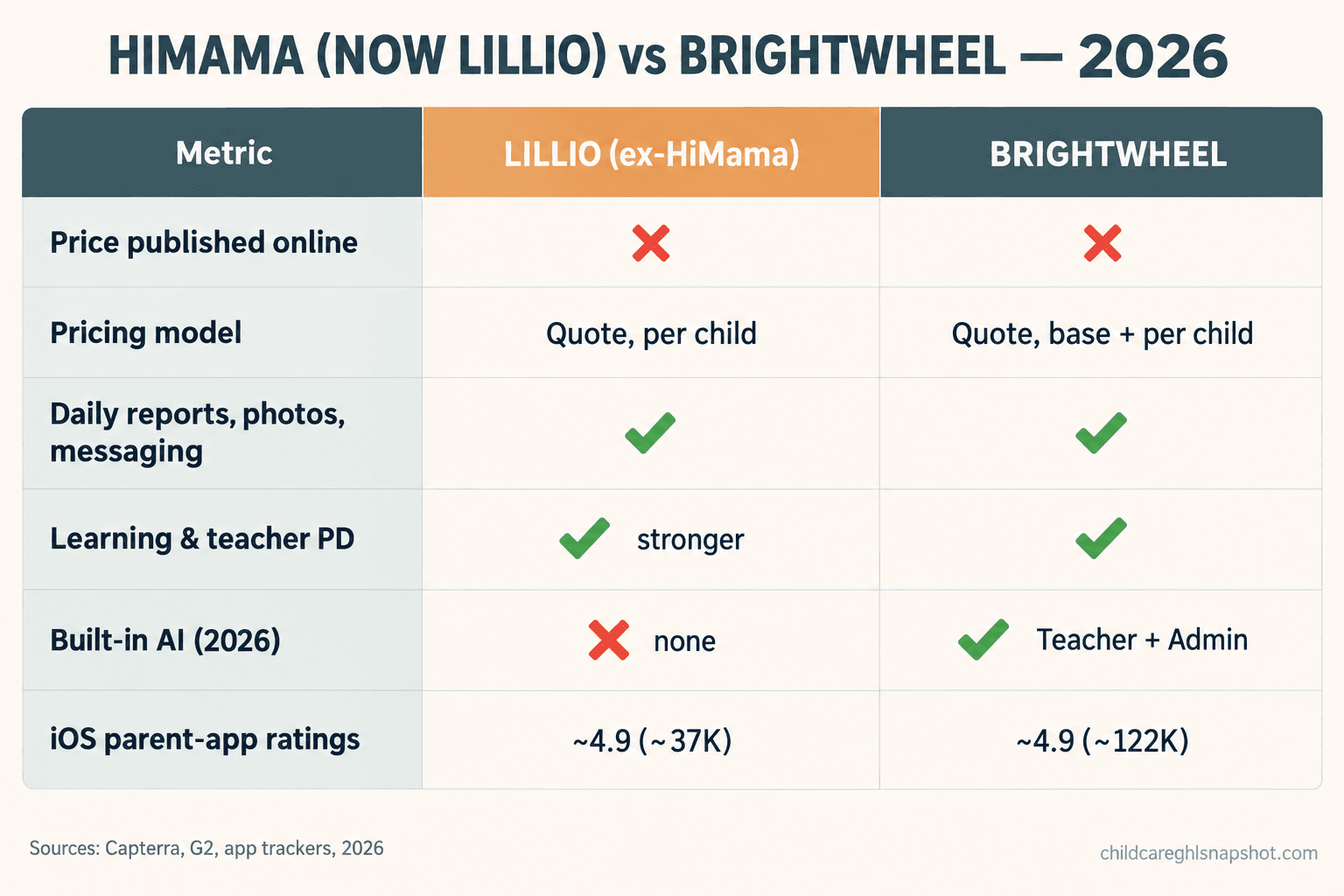
| What matters | Lillio (ex-HiMama) | Brightwheel | Flat-fee follow-up system |
|---|---|---|---|
| Built mainly for | Management + parent comms | Management + parent comms | Enrollment / follow-up |
| Price published online? | No, demo-gated | No, demo-gated | Yes, one-time fee |
| Pricing model | Quote (per child) | Quote (base + per child reported) | One-time + GHL sub |
| Free tier | No | No | n/a |
| Daily reports, photos, messaging | Yes | Yes | No (pairs with these) |
| Learning, assessment, teacher PD | Yes (CDA, Lillio Academy) | Yes (Curriculum & Assessments) | No |
| 2026 built-in AI | None documented | Yes (Teacher + Admin, web-first) | n/a |
| iOS parent-app rating | ~4.9 (~37K ratings) | ~4.9 (~122K ratings) | n/a |
| Speed-to-lead, tour reminders, waitlist | No | No | Yes |
| Time to go live | Weeks | Days to weeks | ~24 hours |
Now the plain-English version of the rows that actually decide it.
Daily reports and parent messaging, the heart of both apps. This is why you pay either company, and honestly, it is close. Both send a clean daily report with photos, meals, naps, and diaper logs, and both let parents message a teacher. On Capterra’s side-by-side, Lillio sits at 4.6 stars across more than 3,600 reviews and Brightwheel at 4.7 across more than 3,200, which is a rounding error, not a verdict. The real difference shows up in the small stuff: Lillio reviewers mention message attachments that do not always send, and Brightwheel users sometimes want easier whole-class messaging. Trial both and send yourself a week of real reports first. A good daily report your parents actually read matters more than any feature list.
Learning, assessments, and teacher development. This is Lillio’s lean, with CDA-aligned lesson planning, child assessments, and professional development through Lillio Academy. Brightwheel has a Curriculum and Assessments module too, but Lillio markets itself as the one that also grows your teachers. If you are chasing a state quality rating or your staff are working toward credentials, that weighs toward Lillio.
Billing. This is Brightwheel’s strength and its sore spot at once. Its payments are prominent and well-used, and they are also its most common complaint source: confusion after billing updates, limited control over payment timing, harder tracking of credits and failed payments. If tuition collection is your headache, Brightwheel probably does more here, just know billing is where its reviews get spiky. We covered tuition auto-pay and late-payment recovery separately.
Built-in AI, the real 2026 wedge. This is the clearest gap. Brightwheel’s 2026 Back-to-School release added AI: a Teacher AI Assistant for lesson activities and insights, and an Admin AI Assistant you can ask questions and hand small tasks, answering from your program’s own data. It is web-first today rather than fully in the mobile app. Lillio, as of this writing, has no publicly documented AI feature. If AI is a tiebreaker for you, Brightwheel is the one shipping it.
Parent adoption and app ratings. Both apps sit at roughly 4.9 stars on the App Store, but the scale is not equal. Brightwheel’s app carries well over 120,000 iOS ratings; Lillio’s carries around 37,000, per third-party trackers (App Pricing Lab, AppFollow). That is a proxy for how many families use each one daily, not a quality score, but it tells you Brightwheel has the larger install base, so incoming families are likelier to have used it before.
Approximate number of iOS App Store ratings on each company’s parent app, as logged by third-party app trackers in 2026 (Brightwheel ~122,600; Lillio ~37,272). Both apps average about 4.9 stars; the gap is install-base scale, not rating. Sources: App Pricing Lab, AppFollow. Confirm live counts before quoting exact figures.
The one job neither app does
Here is the thing that gets lost in every Lillio-versus-Brightwheel thread. Both are apps for families who already enrolled. They are brilliant at the inside of your center and silent about the outside of it. Neither answers the mom who called while you were covering the toddler room. Neither texts the dad who booked a tour and then went quiet. Neither works your waitlist when a spot opens at 4pm on a Friday.
That gap costs real money, because demand is not your problem. 46% of children under 6 lived in a licensed child care desert in 2025, per the Center for American Progress. Families are calling. The question is whether you catch them, and the research on speed is blunt: in general sales studies cited across the enrollment industry, a lead contacted 30 minutes after reaching out is far less likely to connect than one contacted within five minutes. Childcare families shop more than one center, and they tend to go with whoever calls back first.
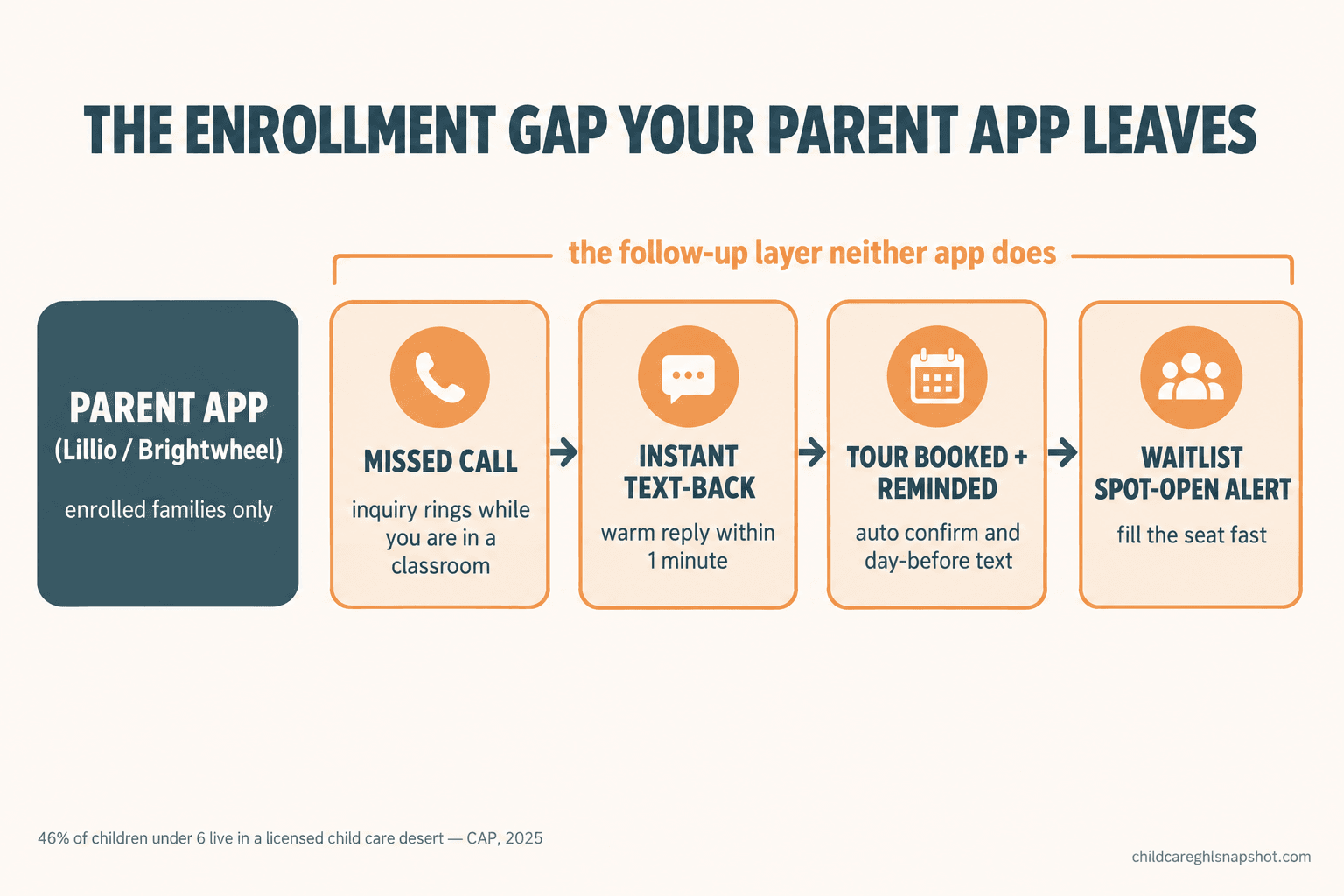
So the honest way to think about it: Lillio or Brightwheel runs your enrolled families well. A separate follow-up layer runs your prospective families, with missed-call text-back, automatic tour confirmations and reminders, and waitlist nurture that keeps families warm until a seat opens. You do not replace your parent app to fix enrollment. You add the piece it was never built to be.
Steal this: the parent messages that do the work
Whichever app you keep, the communication is only as good as the words, and the expensive platforms do not have better copy than this. Here is a set you can lift today, warm, short, and easy to reply to from a phone.
The new-family welcome (the day they say yes):
Welcome to the [Center Name] family, [First Name]! We cannot wait to meet [child] on [start date]. I will send your first-day checklist tomorrow so nothing feels rushed. Save my number, and text me anytime a question pops up.
The photo moment that builds loyalty (any ordinary good day):
[child] painted their first masterpiece today and would not put the brush down. Sending the photo your way. Little moments like this are exactly why we love what we do.
The review ask (to a happy family after a milestone, timed well, never random):
It has been such a joy watching [child] grow with us, [First Name]. If you have 30 seconds, a quick Google review helps other local families find a spot they can trust: [link]. Thank you for being part of our center.
That short set is the spine of keeping a family engaged. The apps send these on a schedule; the warmth is still your job. Automate the sending, not the caring.
Which one fits you: home daycare, single center, small group
The right pick changes with your size. Here is the same decision run three ways.
The home daycare (about 12 children). You do not need the heaviest tool, and you should not pay a per-child rate that treats you like a 100-child center. Lillio and Brightwheel both work here, so pick on feel and keep whichever your families find easier. Then spend your energy on not missing the phone: at your size one lost inquiry is a real chunk of your month, so a simple missed-call text-back matters more than any premium feature.
The single center (about 60 children). This is the real battleground, where the per-child question bites. Pick the parent app on the job you struggle with most: if it is billing and you want AI for your office, lean Brightwheel; if it is curriculum and growing newer teachers, lean Lillio. Then add a flat-fee follow-up layer for speed-to-lead and tours, because at 60 kids the money lost to slow callbacks dwarfs the price gap between the apps.
The small group (two or three sites, about 150 children). Now the pricing model is the whole game. A per-child rate across 150 children adds up fast, so get the all-in number for every site in writing and ask hard about multi-site discounts. Brightwheel’s new admin AI may help a small office team manage across locations; Lillio’s teacher PD may help if you are standardizing quality across sites. Either way, centralize your enrollment follow-up in one flat-fee system across all locations rather than paying per site for it.
Operator reviews on Capterra in 2026 (Lillio 3,623 at 4.6 stars; Brightwheel 3,254 at 4.7). Both are mature, heavily reviewed products, so neither is a risky bet. Source: Capterra comparison.
The compliance part you cannot skip
Before you automate a single parent text, clear up the rules, because getting this wrong is expensive in a way no app saves you from. First, drop a myth: FERPA, the school-records law, generally does not apply to private licensed daycares, so do not let a vendor wave it at you. Your real obligations come from your state’s licensing rules on child-record confidentiality and on photo and video consent, which most states require in the licensing packet and which you cannot make a condition of enrolling a child.
The line to hold: never name or show a specific child in your marketing without consent on file, and keep any automation that touches attendance or health data in the parent-only channel, never feeding your marketing list. Your parent app lives in that private channel by design; your enrollment follow-up lives in the marketing channel, and the two must not cross.
Texting families is also governed by the TCPA and by A2P 10DLC, the carrier rules for business texting. In plain terms: you need real consent to text a family, every message needs a clear opt-out (reply STOP), and your sending number should be registered so your texts deliver. We wrote the full version in the 2026 guide to texting daycare parents legally. Read it once before you turn anything on.
Your likely objections, answered
“I already pay for one of these. Do I have to switch?” Almost certainly not. If your families are happy with HiMama or Brightwheel, keep it. The gap you are feeling is usually new enrollments, not daily reports, and you fix that by adding a follow-up layer, not by putting every parent through a painful app migration. Switching a parent app you already like is pain for no gain.
“Isn’t Brightwheel’s new AI reason enough to move?” It is a genuine edge, but be honest about what it does. The AI helps your teachers plan activities and your office answer questions from your own data. It does not catch a missed call or chase a tour no-show. If your pain is enrollment, the AI is solving a different problem than the one costing you seats.
“Will families find automated messages annoying?” They find slow, robotic, no-reply messages annoying. A warm note sent at the right moment, from a number they can text back, reads as a center that is on top of things. Automate the timing, not the tone.
Your questions, answered
Is HiMama the same as Lillio?
Yes. HiMama rebranded to Lillio in late 2023. Same company, same app your families use, with a new name and a bigger push into curriculum, assessments, and teacher development through Lillio Academy. Some parents will still call it HiMama out of habit.
How much do Lillio and Brightwheel cost in 2026?
Neither publishes a usable price online; both require a demo for a quote. Capterra and G2 list both as contact-vendor with no free version. Operators commonly report Brightwheel charging a base fee plus a per-child rate, so on either call, ask for the all-in monthly cost for your exact child count and whether it is flat or per child.
Which app is better for parent communication, Lillio or Brightwheel?
On the core features (daily reports, photos, messaging, check-in) it is close to a tie, both around 4.9 stars on iOS. Brightwheel has the larger install base and, as of 2026, built-in AI. Lillio leans harder into curriculum and teacher training. Pick on the job you struggle with most, then trial both.
Does either Lillio or Brightwheel help me enroll new families?
Not really. Both are built for families already enrolled: daily updates, messaging, billing. Catching new inquiries fast, booking and reminding tours, and nurturing a waitlist is a separate job, best handled by a dedicated follow-up system that runs alongside your parent app.
Is it worth switching to Brightwheel just for the AI?
Only if your pain is curriculum planning or office admin, which is what Brightwheel's 2026 Teacher and Admin AI assistants help with. If your real problem is losing enrollments to slow callbacks, the AI solves a different problem. Weigh the cost of retraining every parent on a new app against what the AI actually changes day to day.
So, back to that hallway at pickup. The app on your phone is probably fine. Lillio and Brightwheel are both good at keeping enrolled families in the loop, and the one you already use is rarely worth the upheaval of a switch. The center three doors down is not beating you because it picked the shinier icon. It is beating you if it answers the phone faster than you do. Keep the parent app your families like, add the follow-up piece neither was built to be, and let the shiny-icon debate go. The margins in this business are thin enough that every enrolled family counts, which is why the software should fit your center, not someone else’s brochure.